
For UK carers and families, the most reliable approach is to combine The Daily Dose Tracker with your phone's built-in emergency features. Together, they cover two distinct failure modes: a first responder who cannot unlock your phone, and a carer who needs the full medication picture remotely.
Your immediate shortlist:
- The Daily Dose Tracker — AI-assisted medication management with emergency contact integration, household sharing, and exportable summaries; UK GDPR-compliant.
- Apple Medical ID (iPhone Health app) — lock-screen accessible without unlocking; stores key medications, allergies, and emergency contacts natively.
- Android Emergency Info / Personal Safety — the Android equivalent; visible from the lock screen via Emergency Call.
- Third-party medical-ID apps — a broad category that adds QR cards, PDF export, and one-tap call buttons where native features fall short.
Mayo Clinic guidance makes the case plainly: accessibility at the moment of crisis is the single most important feature of any emergency medical ID. Burying data behind a login or a paywall makes it useless to a paramedic. The combination above solves that by putting the critical fields on the lock screen and the full medication record one authorised tap away.
Table of Contents
- How do the main options compare for emergency access and medication management?
- What should you look for when choosing an app for emergencies?
- How to set up emergency contacts on iPhone, Android, and a medication app
- What should you check for privacy and UK GDPR when sharing medical data with carers?
- What should you put in an emergency medical profile?
- Why Thedailydosetracker is a strong choice for UK carers
- Key takeaways
- The habits that actually protect carers in a real emergency
- Thedailydosetracker: integrated medication and emergency contact management for UK carers
- Useful sources and where to read more
How do the main options compare for emergency access and medication management?
The table below covers the six most relevant options for UK carers. Emergency contact integration in medication apps varies considerably across them, from zero caregiver sharing to full multi-patient household management.
| Option | Emergency accessibility | Medication management | Caregiver / household sharing | UK GDPR / privacy | Offline / export | Platform | Price |
|---|---|---|---|---|---|---|---|
| The Daily Dose Tracker | Emergency contact integration, exportable summaries for paramedics | Dose reminders, interaction checks, refill alerts, AI insights | Multi-patient, household sharing, delegated carer access | UK GDPR-compliant; security page published | Exportable summaries; progressive web app | iOS, Android, web | Free core; paid Individual and Pro tiers |
| Apple Medical ID | Lock-screen access without unlocking; SOS shortcut | None | None | Stored on-device / iCloud; Apple privacy policy | On-device; no export | iOS only | Free |
| Android Emergency Info / Personal Safety | Lock-screen access via Emergency Call | None | None | On-device; Google privacy policy | On-device; no export | Android only | Free |
| Medisafe | Emergency contact notification ("Medfriend") | Dose reminders, interaction checker | Single carer notification | US-based servers; GDPR status not prominently stated for UK | Limited export | iOS, Android | Free core; paid tier |
| MyTherapy | No dedicated lock-screen emergency access | Dose reminders, symptom log, health journal | Basic sharing report | GDPR-compliant (EU-based) | PDF health report export | iOS, Android | Free |
| MedicAlert (MedicAlert UK) | Physical bracelet / QR card; 24/7 emergency line | None (physical ID service) | Emergency line contacts family | UK-based; ICE database | Physical card; 24/7 operator | Physical + web | Annual membership fee |
The Daily Dose Tracker covers the widest range of needs in one place: medication reminders, caregiver delegation, and exportable emergency summaries. Its progressive web app means it works across any device without a separate download.
Native phone features (Apple Medical ID and Android Emergency Info) are unbeatable for pure lock-screen speed. A paramedic can read your key medications and call your emergency contact without touching a passcode. The limitation is that they hold only what you type into a handful of fields; they have no reminder logic, no interaction checks, and no caregiver sharing.
Medisafe has a useful "Medfriend" feature that alerts a nominated contact when you miss a dose, which is a practical safety net. Its UK GDPR posture is less clearly documented than Thedailydosetracker's, which matters if you are storing sensitive health data.
MyTherapy produces a tidy PDF health report, but it has no lock-screen emergency access and its sharing features are limited to a summary report rather than live delegated access.
MedicAlert UK is a different model entirely: a physical bracelet or card linked to a 24/7 emergency line that contacts your family when responders call in. It complements digital tools rather than replacing them, particularly for people who cannot reliably carry a charged phone.
What should you look for when choosing an app for emergencies?
The decision comes down to three questions: can a paramedic read the critical information without unlocking the phone, can a carer access the full medication record remotely, and does the app handle your health data under UK law?
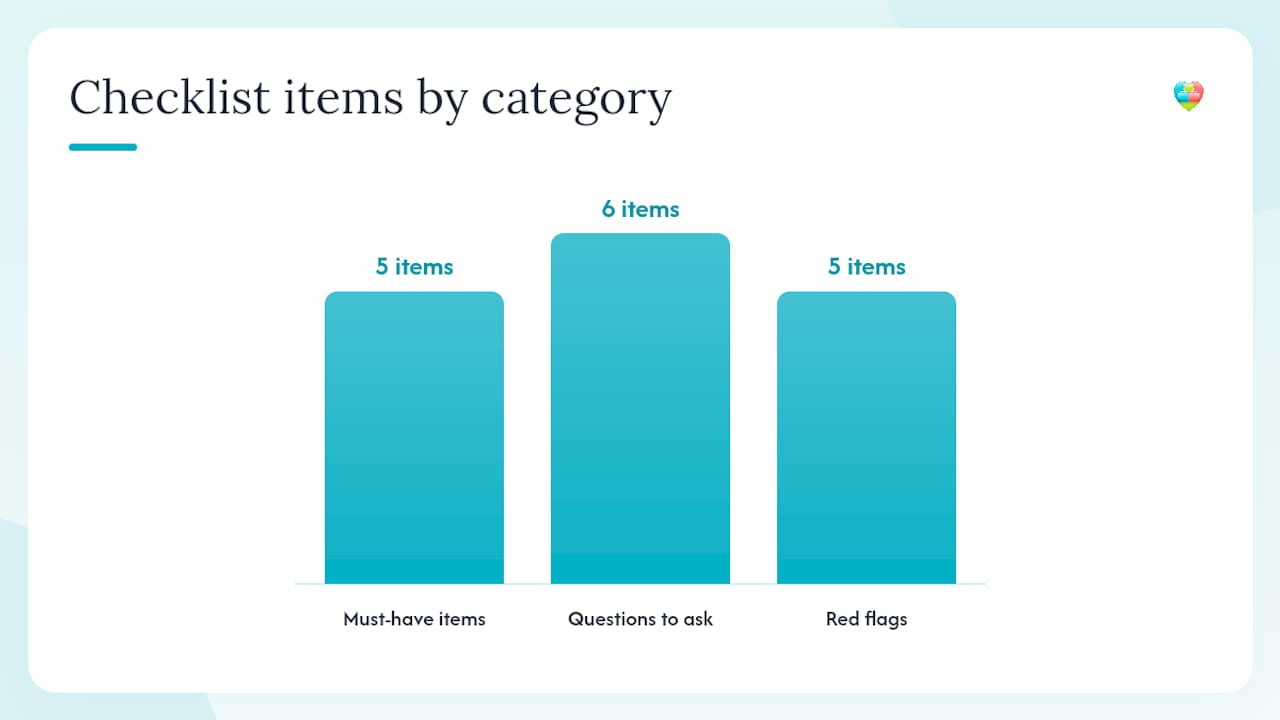
Must-have capabilities:
- Lock-screen or SOS access to at least name, key medications, allergies, and one emergency contact
- Support for multiple emergency contacts with labelled roles (e.g. "daughter / primary carer")
- Offline access or an exportable summary a paramedic can read when there is no signal
- Caregiver delegation so a family member can view and update the medication record
- Clear UK GDPR compliance statement and a named data controller
Questions to ask before you install:
- Can a first responder see emergency information without unlocking the device?
- How many emergency contacts can you store, and are roles labelled?
- Is there an offline export or printable summary?
- Are emergency features free, or gated behind a paid tier?
- Where is health data stored, and is the data controller UK or EU-based?
- How do you recover access if you lose your phone or forget your password?
Red flags to avoid:
- Emergency contact or medical ID features locked behind a subscription paywall
- No offline export or printable backup
- No caregiver or family sharing roles
- Vague privacy policy with no mention of UK GDPR or ICO registration
- No account recovery path that does not expose your health data
Connected medication management systems that offer exportable summaries and caregiver roles reduce handover friction during emergencies and make paramedic triage faster. That is the standard worth measuring any app against.
How to set up emergency contacts on iPhone, Android, and a medication app
Speed matters here. The goal is that a paramedic picking up your phone can find your medications and call your emergency contact within thirty seconds, with or without your PIN.
iPhone: Apple Medical ID
- Open the Health app and tap your profile photo, then Medical ID.
- Tap Edit and fill in: name, date of birth, medical conditions, medications (drug name and dose), allergies, blood type, and any implanted devices.
- Add at least two emergency contacts with their relationship to you.
- Toggle Show When Locked to on. This is the critical step: without it, the Medical ID is invisible to a first responder.
- To verify: lock your phone, swipe to the Emergency Call screen, and tap Medical ID in the bottom-left corner.
Android: Emergency Info / Personal Safety
- Open Settings, search for Emergency Information or Personal Safety (the path varies by manufacturer: on Pixel devices it is Settings → Safety & emergency → Emergency information).
- Add your name, medical conditions, blood type, allergies, and medications.
- Add emergency contacts; they will appear on the lock screen when someone taps Emergency then Emergency information.
- On Android 12 and later, long-pressing the power button triggers Emergency SOS, which can also surface this screen.
- Test it by locking the device and following the Emergency tap path.
Medication app: The Daily Dose Tracker
- Create your medication schedule and add each medicine with its dose and timing.
- In the emergency contact section, add at least two contacts with their roles clearly labelled.
- Enable household or caregiver sharing so a family member has delegated access to your medication record.
- Generate and download an exportable emergency summary. Save a copy offline or print it.
- Share the summary link or PDF with your GP and any regular carers.
Pro Tip: Print a wallet-sized emergency card or attach a QR sticker to the back of your phone case. If your phone is locked, damaged, or out of battery, a paramedic can scan the QR code or read the card. Place a second copy in your medication bag or on the fridge door, which is where UK ambulance crews are trained to look for a "message in a bottle" or similar home emergency information.
Open-source medication app projects have demonstrated that QR code export and PDF emergency cards are technically straightforward to implement. The gap between apps is not technical capability but whether the developer has prioritised it as a free feature.
What should you check for privacy and UK GDPR when sharing medical data with carers?
Sharing health data with a carer is a legitimate and often necessary act. Under UK GDPR, health data is classified as special category data, which means any app storing or processing it must meet a higher standard of protection than ordinary personal data.
Privacy checklist for any medication or medical-ID app:
- Named data controller and UK ICO registration number (check the ICO register at ico.org.uk)
- Explicit UK GDPR compliance statement, not just a generic "GDPR compliant" badge
- Data storage location (UK or EU servers are preferable; US-based storage requires additional safeguards)
- Encryption at rest and in transit (look for TLS/HTTPS and AES-256 or equivalent)
- Clear data retention and deletion policy
- Granular sharing controls so you choose exactly what a carer can see
- Account recovery process that does not expose health data to an unverified party
Common risky practices to avoid:
- Apps that share your full medication record with any contact by default
- Emergency information gated behind a paid subscription (a first responder will not pay to see your allergy)
- Weak or email-only account recovery with no two-factor authentication
- No clear process for withdrawing carer access when circumstances change
"Personal health records and online patient portals let you view and share health information — but the key is controlling exactly what you share and with whom. Storing medication lists, allergies, and emergency contacts in a system you understand and trust is the foundation of safe digital health management." — MedlinePlus, Patient portals and personal health records
Thedailydosetracker publishes a dedicated security page outlining its UK GDPR compliance measures and data handling practices, which is the minimum transparency standard you should expect from any app in this category.
What should you put in an emergency medical profile?
A first responder has seconds, not minutes. The profile needs to answer the three questions that matter most in those seconds: what is this person taking, what must we not give them, and who do we call?
Core fields to complete:
- Full name and date of birth
- Key medications: drug name, dose, and frequency (e.g. "Warfarin 5 mg once daily")
- Major allergies and the reaction type (e.g. "Penicillin — anaphylaxis")
- Chronic conditions relevant to treatment decisions (e.g. "Type 2 diabetes", "atrial fibrillation")
- Implanted devices (pacemaker, insulin pump, cochlear implant)
- Blood type, if known
- Advance directives or care wishes (e.g. "Do Not Resuscitate order in place — see GP record")
- At least two emergency contacts with role labels: "Daughter / primary carer — 07700 900000" and "GP surgery — 01234 567890"
Professional contacts to include:
- GP surgery name and phone number
- Regular pharmacy name and number
- Any specialist consultant relevant to chronic conditions
- NHS 111 is already known to responders, but your local poison control line (National Poisons Information Service via 111) is worth noting for carers
Mayo Clinic's guidance on emergency health records recommends including vaccinations and chronic conditions alongside medications, and notes that advance directives give clinical teams clear guidance when a patient cannot communicate. The WHO travel and health framework similarly highlights vaccinations and chronic conditions as the items most likely to affect emergency treatment decisions.
For medication entries, keep them scannable: one line per drug, bold the name, follow with dose and frequency. A responder reading "Metformin 500 mg twice daily" processes that faster than a paragraph of context.
Why Thedailydosetracker is a strong choice for UK carers
Thedailydosetracker was built around the specific workflows of family carers and professional care teams, which is where most of the competing apps fall short. The platform covers every dimension in the comparison table above as a single integrated tool.
How it meets the key criteria:
- Emergency contact integration — built into the core platform, not an add-on or a paid feature
"Medication management systems that offer exportable summaries and caregiver roles reduce handover friction during emergencies and make paramedic triage faster." — BD: Medication management solutions
Three practical scenarios where this matters:
Single carer managing an elderly relative. A daughter caring for her mother can set up the mother's full medication schedule, add herself as a delegated carer, and generate an emergency summary to share with the GP. If the mother calls an ambulance, the paramedic can access the summary without needing the daughter's login.
Multi-patient household. A carer managing medications for both a parent with dementia and a child with epilepsy can run both profiles from one account, with separate emergency contacts for each patient.
Professional care team. A small domiciliary care agency can use the Pro tier to coordinate across multiple clients, with each client's emergency contacts and medication history accessible to the on-duty carer.
The emergency contacts in your medication plan guide on the Thedailydosetracker blog covers the practical setup in detail, including how to label contacts by role so responders know who to call first.
Key takeaways
The most reliable emergency setup combines native phone features for instant lock-screen access with a dedicated medication app for the full clinical picture and caregiver sharing.
| Point | Details |
|---|---|
| Lock-screen access is non-negotiable | Set up Apple Medical ID or Android Emergency Info so paramedics can act without unlocking your phone. |
| Multiple labelled contacts matter | Store at least two emergency contacts with role labels (e.g. "primary carer") so responders know who to call first. |
| Offline export protects against device failure | Print or save an emergency summary; a phone that is locked, damaged, or flat is useless to a first responder. |
| UK GDPR compliance is the privacy baseline | Any app storing health data should name its data controller and confirm UK GDPR compliance before you share sensitive records. |
| Thedailydosetracker | Covers emergency contact integration, household sharing, exportable summaries, and UK GDPR compliance in one free-to-start platform. |
The habits that actually protect carers in a real emergency
Most carers set up a Medical ID once and never touch it again. That is the single most common mistake, and it is an easy one to make because the setup feels like a one-time task. Medications change. Doses change. Emergency contacts change numbers or move abroad. An outdated Medical ID is worse than a blank one in some respects, because it gives a responder false confidence.
The carers who handle emergencies well tend to do three things differently. They combine their phone's native emergency screen with a medication app for the full record, and they keep a printed card somewhere predictable. Not in a wallet that gets left at home, but on the fridge or in the medication bag that travels with the patient.
Common mistakes worth avoiding:
- Listing only one emergency contact. Phones go unanswered; people are unavailable. Two contacts minimum, with roles labelled.
- Storing emergency information behind a paywall. If a feature requires a subscription to display in an emergency, it will fail the one time it matters.
- Skipping the offline backup. Digital tools fail when devices are locked, damaged, or out of power. Mayo Clinic recommends a physical printed card as a backup for exactly this reason.
- Forgetting to test. Lock your phone right now and try to find the Medical ID. If you cannot do it in under ten seconds, a paramedic cannot either.
A practical routine: review emergency contacts and medication entries every time you collect a repeat prescription. That is roughly every 28 days for most patients, which is frequent enough to catch a dose change before it becomes a problem. Set a calendar reminder alongside the prescription collection. For carers managing complex schedules, building this check into an existing routine is far more reliable than treating it as a separate task.
The shared medication apps guide for UK families is worth reading if you are setting up caregiver access for the first time. The household sharing workflow is less obvious than it looks, and getting it right from the start saves a lot of back-and-forth.
Thedailydosetracker: integrated medication and emergency contact management for UK carers
If you have read this far, you already know the gap that most apps leave: either they handle medication reminders well but have no emergency contact integration, or they surface emergency info on the lock screen but have no reminder logic or caregiver sharing. Thedailydosetracker closes that gap.
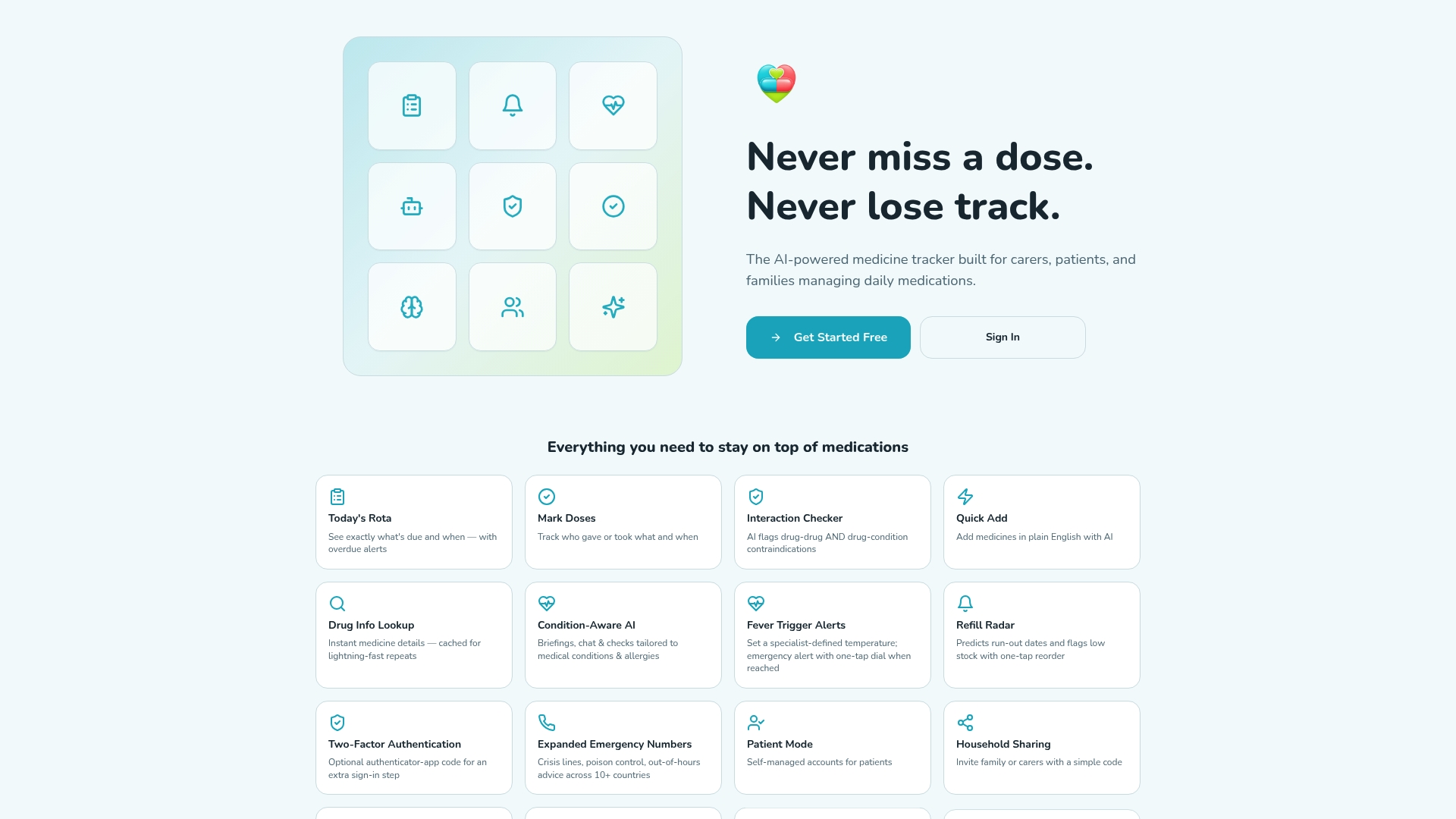
For UK carers and families, the platform brings together everything the comparison above identified as must-haves: emergency contact integration, multi-patient household sharing, exportable emergency summaries for paramedics, drug interaction checks, and UK GDPR-compliant data handling. The core features are free to start. Advanced AI tools, multi-patient management, and appointment scheduling sit behind the Individual and Pro tiers, but emergency contact integration is available from day one.
The free tier is a genuine starting point, not a stripped-down preview. You can set up a full medication schedule, add emergency contacts, and generate an exportable summary before you spend a penny.
Start with the free plan and see how it fits your household's needs.
Useful sources and where to read more
A short note before the list: NHS ambulance guidance on lock-screen procedures varies by trust. Check your local ambulance service's patient information pages for the most current advice on how crews access emergency information in your area.
- Emergency health information: Keep your personal and family records within reach - Mayo Clinic
- MedlinePlus: Patient portals and personal health records
- World Health Organization: Travel and health
- BD: Medication management solutions
- The Daily Dose Tracker – Free Medicine App for Carers & Families
- The Daily Dose Tracker – Security
- Emergency contacts in your medication plan: 2026 guide
- nishtha-agarwal-211/Smart-Medicines (GitHub)
This article provides general information about medication management tools and emergency contact features. It is not medical or legal advice. Verify current NHS guidance and consult a qualified healthcare professional for decisions about your specific medication or care needs.