
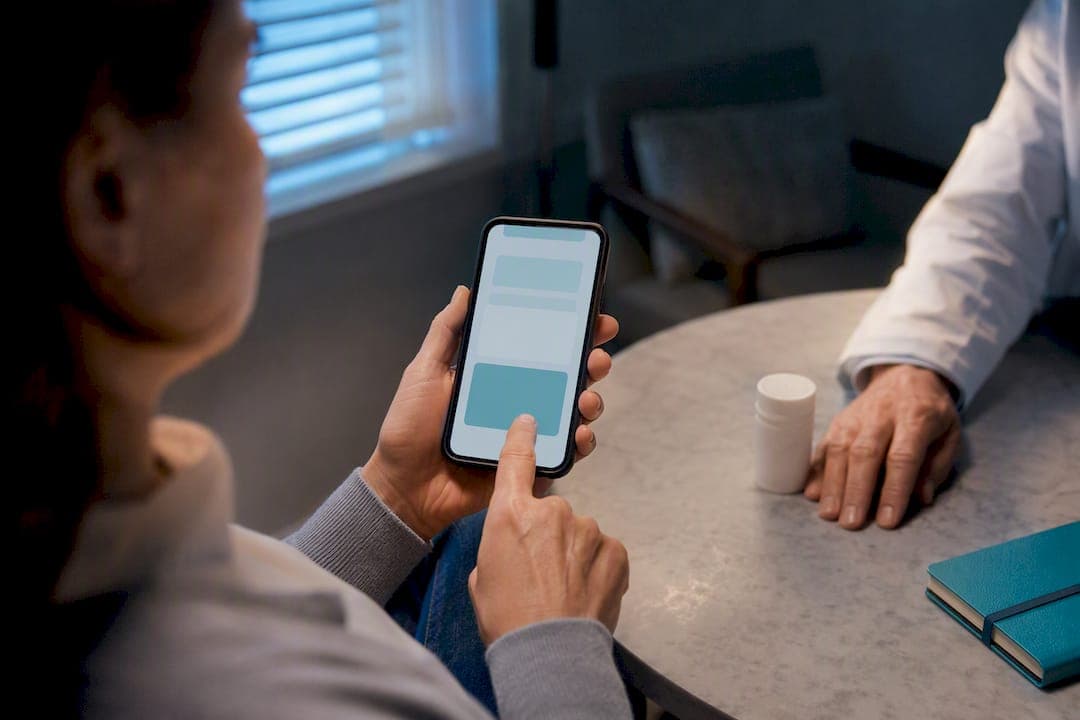
The most effective approach combines a persistent, logged reminder system with one simple daily routine, not either alone. That means an alarm that keeps sounding until you respond, a log of every dose taken or missed, and a way to share that record with a carer or clinician. Reminders help you take medication consistently, but they work alongside clinical care, not instead of it.
TL;DR:
- Reliable medication adherence depends on a combination of persistent alarms, accurate logging, and household sharing, not just a single reminder system.
- Set alarms with exact medication names, doses, and schedules, ensuring they override Do Not Disturb and require manual confirmation to avoid silent dismissal.
- Always maintain a physical backup, such as a weekly pill organizer or paper checklist, linked to routines like brushing teeth or meals for added reliability.
- Use alarms that ring, buzz, or reappear until addressed, and interpret logs as timelines to identify patterns related to seizure activity or missed doses.
- Share detailed logs with healthcare providers through export options and household access, optimizing clinician review rather than relying on vague adherence summaries.
Table of Contents
- Types of epilepsy medication reminder tools and what to look for
- How to set reliable medication reminders on your phone
- Low-tech backups worth keeping alongside any app
- Making alarms hard to ignore and logs worth keeping
- What the evidence actually says about reminder tools
- Tips for troubleshooting common issues with reminder tools
- Comparing the cost and accessibility of different reminder solutions
- Sharing logs with carers and clinicians without oversharing
- A carer's-eye view of what actually works
- Why this platform covers this checklist in one place
- Sources
- FAQ
Types of epilepsy medication reminder tools and what to look for
Reminder tools for epilepsy medication fall into five rough categories: smartphone apps, wearables, dedicated pill timers, SMS or automated phone call systems, and calendar automation through existing phone software. Each has a different failure mode, and that's what should guide the choice.
Smartphone apps are the most flexible epilepsy pill organizer option because they combine alarms with a written log, but they're also the easiest to silence by accident. A phone on Do Not Disturb during a work meeting can swallow an alarm entirely unless the app has permission to override it. Wearables solve the "phone left in another room" problem with a vibration on the wrist, though battery life becomes another thing to track. Dedicated pill timers, the kind built into a locking pill box, are the most reliable for people who don't want a screen involved at all, but they rarely log anything for later review. SMS or automated call reminders work well for older adults or anyone who doesn't use a smartphone confidently.
Whichever category you choose, insist on these features:
- Persistent alarms that repeat or escalate rather than a single soft chime
- Taken/skipped logging with a timestamp, not just a tick box
- Refill alerts tied to your actual prescription count
- Exportable reports in PDF or CSV format for appointments
- Household sharing so a carer sees the same log
- Offline reliability so a dropped signal does not cancel the alert
- Drug interaction notes if you're on more than one medication
A tool missing the logging feature might get you to take your tablets on time today, but it gives your neurologist nothing to work with in six months.
How to set reliable medication reminders on your phone
Getting the alarm right matters more than which app you use. Most epilepsy treatment reminders fail not because the software is bad, but because the settings underneath it are too permissive. Here's a setup that holds up under real-world conditions:
- Create a named entry for each medication rather than a generic "pills" alarm, including the dose and instructions (with food, on waking, and so on).
- Set the actual repeat pattern, not a rough approximation. Twice-daily epilepsy medication rarely means exactly 12 hours apart. Match it to your prescribed schedule.
- Add refill alerts a week or so before you'll run out, so a delay at the pharmacy doesn't turn into a missed dose.
- Allow the app to bypass Do Not Disturb or enable persistent/sticky notifications so the alarm cannot be silently dismissed.
- Require manual confirmation for every dose, taken or skipped, rather than letting the app assume compliance.
- Mirror the alarm on a second device where possible, a tablet or a carer's phone, so one dead battery doesn't break the whole system.
None of this takes more than ten minutes to configure once. The mistake most people make is setting up the alarm and never touching the permissions that decide whether it actually rings.
Low-tech backups worth keeping alongside any app
Digital tools fail occasionally, so a physical backup earns its place even in a well-run digital system. A weekly pill organiser, kept somewhere you look every day rather than tucked in a drawer, gives you a visual check that an app can't replicate at a glance.
- Pair a daily pill box with your phone alarm, not instead of it
- Link doses to an existing habit, like brushing your teeth or eating breakfast, so the routine survives a phone left on the wrong ringer setting
- Keep a simple paper or whiteboard checklist for the week as a visual backup
- Ask a carer to do a quick check-in call at a set time, especially for a change in dosage or a new medication
Making alarms hard to ignore and logs worth keeping
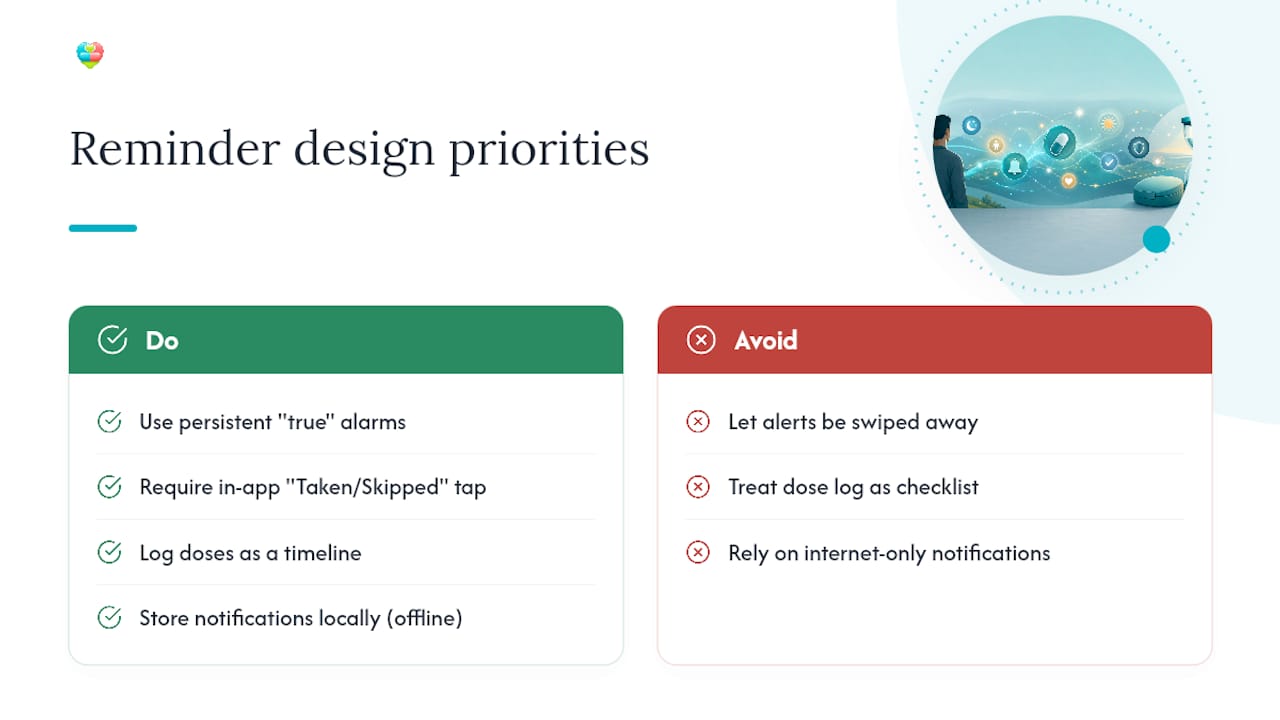
A reminder that can be swiped away without a second thought becomes background noise within days. The fix is what's sometimes called true-alarm behaviour: an alert that keeps ringing, buzzing, or reappearing until you interact with it directly, rather than one that clears itself after a few seconds. A genuine interaction means tapping "taken" or "skipped" inside the app, not just dismissing a notification banner.
The second habit worth building is treating your dose log as a timeline, not just a checklist. Lining up dose times against any seizure activity can reveal patterns, for instance whether missed evening doses cluster before breakthrough events, information a simple percentage score won't show you.
Pro Tip: Check that your chosen app stores notifications locally rather than relying purely on an internet connection. A weak signal on a train or in a hospital waiting room shouldn't be the reason an alarm never fires.
A randomised pilot trial found that people using a structured reminder app saw a notable rise in high-adherence scores over six months, compared to a smaller improvement in the control group, using the MMAS-8 adherence scale. That gap is the strongest evidence yet that structured reminder systems for epilepsy meds outperform simple willpower or memory alone.
What the evidence actually says about reminder tools
The difference in adherence between the intervention and control groups is encouraging, but it comes with a caveat worth taking seriously: better adherence doesn't automatically mean fewer seizures in the same timeframe. Adherence and seizure control are linked, but the relationship plays out over months, and other factors, dose adjustments, medication changes, sleep and stress, all interfere with the picture.
Improving how consistently someone takes their medication is a necessary step toward better seizure control, but it works as part of a clinician-guided plan rather than a standalone fix.
The practical takeaway: use a reminder system to raise adherence and to build a data trail your neurologist can actually use at your next dose review, rather than expecting the alarm itself to change your seizure frequency.
Tips for troubleshooting common issues with reminder tools
Most complaints about medication reminder apps come down to a handful of repeat problems, and nearly all of them are fixable in the settings rather than by switching apps.
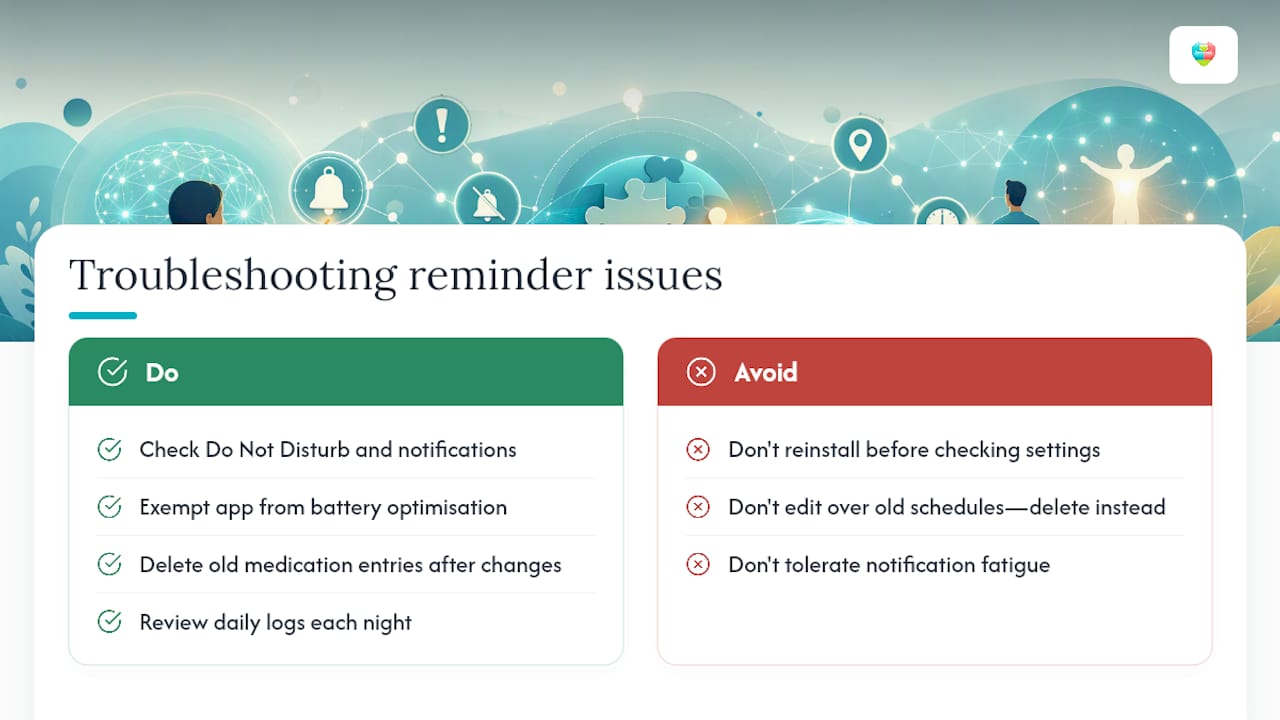
Alarms not sounding at all usually means Do Not Disturb, battery optimisation, or a phone's "sleeping apps" feature is quietly stopping notifications in the background. Check the app's notification permissions and add it to any battery optimisation exemption list.
Duplicate or overlapping alarms tend to happen after a dosage change that wasn't fully updated, leaving an old schedule running alongside the new one. Delete the old medication entry entirely rather than editing over it.
Missed logs after the fact are a real gap for anyone who forgets to mark a dose even after taking it. Set a nightly review habit, checking the day's log before bed, so nothing slips through unrecorded.
Sync issues between a carer's device and the patient's are usually a permissions problem rather than a bug. Re-check household sharing settings rather than reinstalling the app.
Notification fatigue, where alerts start getting ignored, is best solved by adjusting the alarm sound or escalation pattern every few months rather than tolerating it. If an alarm has become wallpaper, it has stopped doing its job.
Comparing the cost and accessibility of different reminder solutions
Cost and accessibility vary more than most people expect across these tools. Basic phone calendar reminders cost nothing but offer no logging and no persistent alarm behaviour, which limits them to the simplest schedules. Dedicated medication apps typically run on a freemium model: core scheduling and alerts free, with advanced features like multi-patient management, exports, and AI-based insights behind a paid tier, usually billed monthly or yearly.
Dedicated pill timer devices carry an upfront hardware cost, generally a one-off purchase, but no ongoing subscription, which suits anyone who prefers not to depend on a smartphone. SMS and automated call systems sit in the middle, often free for the recipient but sometimes requiring a paid service on the sending end, and they're the most accessible option for people without a smartphone or with limited digital confidence. Wearables add the highest cost of the group once you factor in the device itself, though they solve the "phone in another room" problem better than anything else.
Accessibility should factor in more than price. Font size controls, dark mode, and voice alerts matter enormously for older adults or anyone with visual or cognitive difficulties, and not every app offers them by default.
Sharing logs with carers and clinicians without oversharing
Clinicians reviewing epilepsy treatment usually want three things: precise timestamps for each dose, a clear pattern of any missed doses, and seizure timestamps sitting alongside the medication record so the two can be compared directly. A vague "adherence was good this month" tells a neurologist far less than a dated log.
- Turn on household sharing so a designated carer sees the same dose log in real time
- Export the record as a PDF or CSV ahead of appointments rather than reading it off a phone screen in the waiting room
- Limit a carer's access to dose confirmation and report viewing rather than full account control, which protects privacy while keeping the workflow useful
- Check that any platform storing these data states its compliance with UK GDPR standards before you rely on it
A carer's-eye view of what actually works
Reminders only earn their place when they change behaviour, not just when they exist. In practice, the households that manage epilepsy medication schedules well tend to run a pill box for the physical check and a logged app for the record, with a carer given viewing access rather than full control. One missed evening dose, logged and flagged, is far more useful at a clinic appointment than a vague memory of "a rough week."
— Prasant
Why this platform covers this checklist in one place
Everything this article recommends, a persistent alarm that won't get swiped away, a proper taken-or-skipped log, refill forecasting, and a way to share all of it with a carer, maps directly onto what Thedailydosetracker offers as a working platform rather than a scattered set of workarounds.
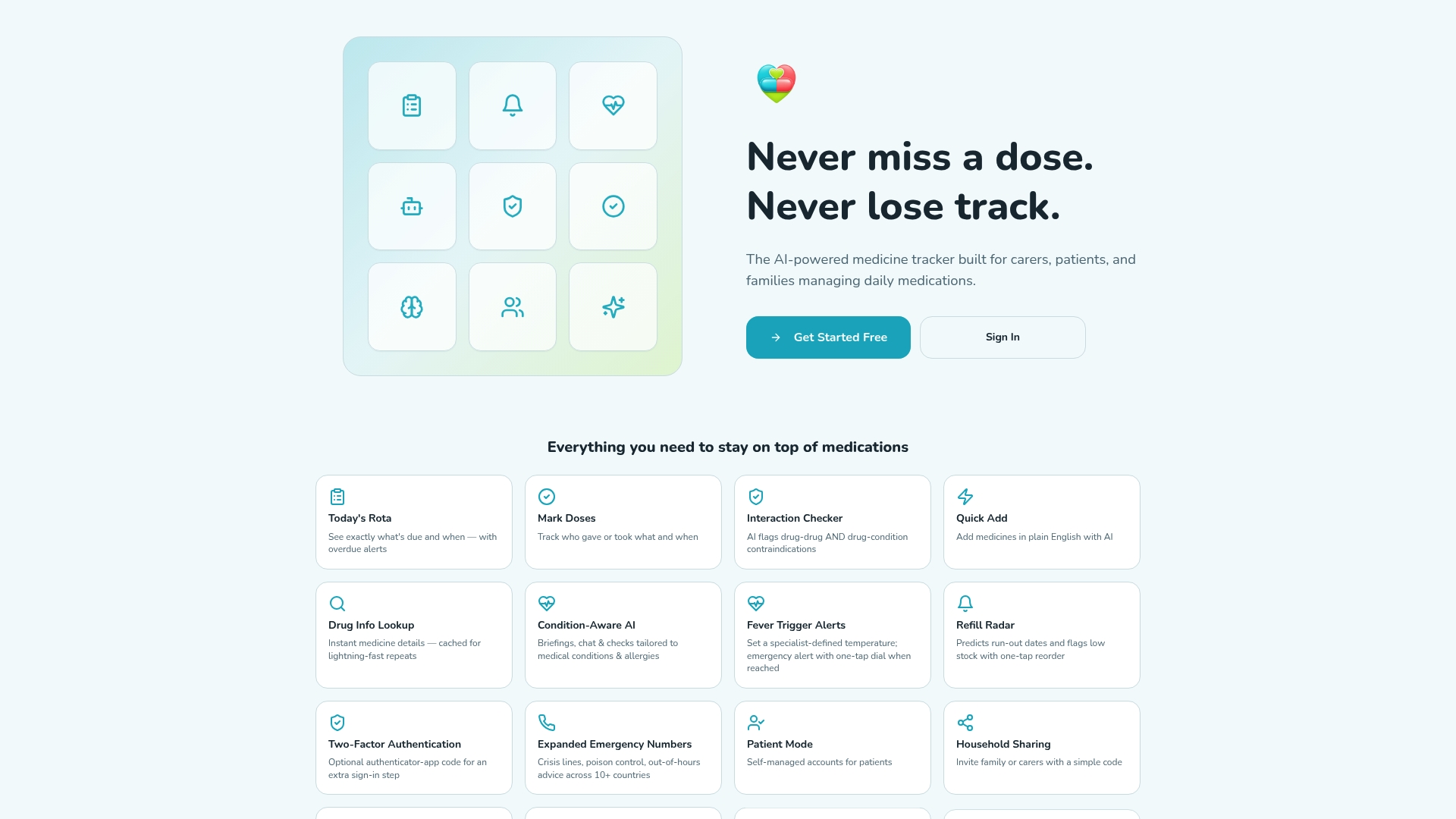
The platform runs on a free tier for the core scheduling and dose alerts, with household sharing, multi-patient management, medication history export, and AI-based insights available on the paid Individual and Pro plans. It's built as a progressive web app, so it works across phones, tablets and desktops without a separate download for each device, and it's designed with UK GDPR compliance in mind for anyone handling sensitive health records. For a household managing epilepsy medication schedules alongside other conditions, that multi-patient view removes the need to juggle several separate apps. If you're weighing up how to remember epilepsy medication reliably, the practical step is to set up a free account and add your first medication entry today at Thedailydosetracker's important links page.
Carers balancing multiple responsibilities at once might also find it worth reading how professional in-home carers build medication checks into daily routines as a complementary backup, or explore how digital reminders work day to day before setting anything up.
FAQ
What are the best medication reminders for epilepsy?
The best options combine a persistent alarm with dose logging and household sharing, rather than a simple one-off alert with no record attached.
How do I set a reminder to take my epilepsy medication?
Create a named entry for each medication with the exact dose time, turn on repeat scheduling that matches your prescription, and allow the app to override Do Not Disturb so the alarm can't be silently missed.
How do I set up medication reminders on my iPhone?
Use the Reminders or Health app to create a scheduled alert, then turn on Time Sensitive Notifications in Settings so the alarm breaks through Focus modes and Do Not Disturb.
Is there an app that reminds you when to take medication and logs it?
Yes. Apps like Thedailydosetracker combine scheduled alerts with a taken/skipped log, refill forecasting, and exportable reports, which basic calendar reminders don't offer.